My First MCP Server
Inspired by OpenAI’s Apps SDK announcement, I challenged myself to deploy a toy MCP server on Cloudflare Workers. Why Cloudflare? I’m attracted by their documentation, developer tooling, I admire their thought leadership on security, a team I work with is migrating part of their infrastructure over to Cloudflare, and it all just feels very approachable (compared with say AWS, which is where I have most of my experience).
As a child of the 80s, I recall being mesmerised by the divinatory powers of the Magic 8 Ball, answering my every yes-no question with an air of nonchalance and confidence. I hadn’t seen an MCP version out in the wild, so why not create one?
If you’re looking for an approachable read on MCP servers, I’d recommend https://fly.io/blog/mcps-everywhere/.
How Did I Get Started?
I read through Cloudflare’s MCP primer and then moved on to their ‘Build a Remote MCP server’ tutorial.
I fired up Claude Code, prompted it with my plan (including all 20 responses from the original toy!), pointed it at some demo code that uses GitHub for auth, and asked that the MCP server supported both HTTP+SSE (now deprecated, but still in use by clients) and the Streamable HTTP transport that appears to have become the standard and a useful simplification (SSE now optional).
Testing with npx @modelcontextprotocol/inspector@latest locally was super helpful!
The MCP server extends Cloudflare’s McpAgent class from their Agents SDK which builds on top of Durable Objects for state management, though it’s effectively stateless right now and offers only one tool called ask that returns a simple response like 🎱 Outlook good.
Testing it Out
You can visit the landing page at https://eightballmcp.slates.workers.dev/ for an overview.
Adding to Claude Code, as an example, is as simple as one of the following commands:
claude mcp add --transport sse eightball https://eightballmcp.slates.workers.dev/sse
claude mcp add --transport http eightball https://eightballmcp.slates.workers.dev/mcp
You’ll then be required to connect to the MCP server using /mcp (if you’re using Claude Code) and you’ll need a GitHub account to authenticate.
Here’s an example of the MCP server in use during a coding session: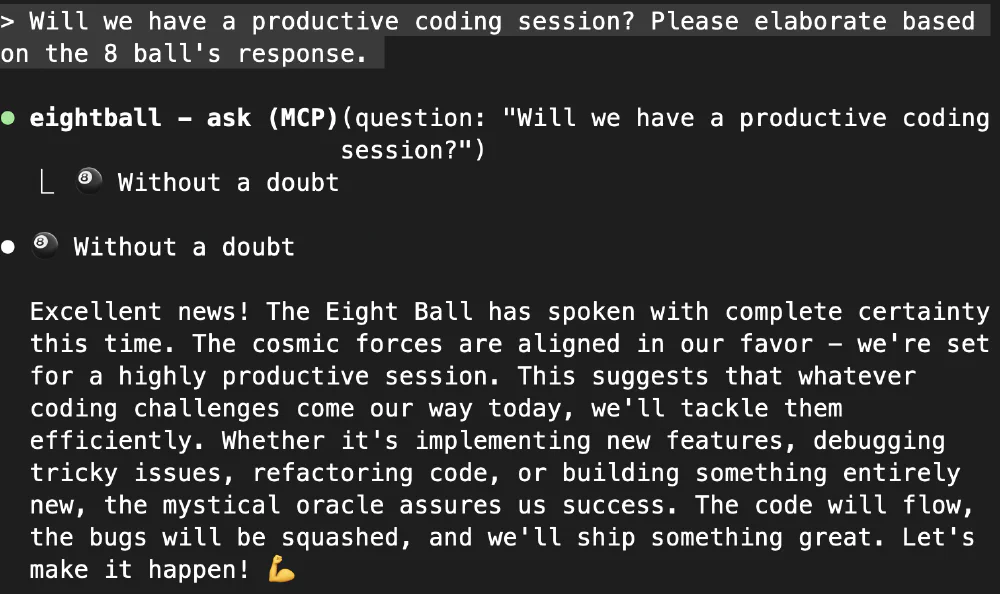
Where to Next?
I could take advantage of Cloudflare’s Durable Objects capability and extend the MCP server with session history and statistics.
I could experiment with writing a simple agent that makes use of the MCP server. Inspired by https://blog.cloudflare.com/code-mode/, I could also play around with how the MCP server’s tool is exposed to the agent. The article was an interesting read and it puts forward the argument that while LLMs have seen a lot of code, they have not seen a lot of tool calls. There’s a little bit more to it, but the basic idea is that you present the tools to the LLM as an API and have them write code to call said API (which is quite amusing if you think about, but MCP servers are still useful—a good server exposes workflows to an agent, not raw endpoints). Working with GitHub Copilot, I recall running into the 128 tools per request limit and did wonder about how effective tool selection is when the LLM is inundated with tools.
I could also try out OpenAI’s Apps SDK and present a custom UI for use within ChatGPT. You can’t publish your own apps yet, but ChatGPT’s developer mode is there to help you test your apps. Be wary of using third-party MCP servers, apps, and connectors that you cannot trust. It’s worth your time reading OpenAI’s documentation on risks and safety.