A Custom UI for Eight Ball MCP
Today’s goal was to get a custom UI up and running in ChatGPT for the Eight Ball MCP server that I built a couple of days ago. It was one of those sessions where if I’d just cracked open and consumed the OpenAI Apps SDK documentation, worked studiously through an example, and made the tweaks myself, I’d have been done in a fraction of the time. Sometimes the coding agents have me tearing my hair out and feeling like I need a small vacation … to, ideally, some place without access to AI.
The key documents that I referenced in my request were the ‘Set up your server’ and ‘Build a custom UX’ pages and the examples repo. Noting that I’ll need to spend more time with these documents as I didn’t fully follow everything going on.
Claude Code was running me around in circles and so I decided to spin up Codex CLI. It had been a while. After figuring out how to get it to search the web (those curl calls it was constructing tipped me off that something was amiss) by updating ~/.codex/config.toml, I presented it with my goal and was left blown away by the detailed plan! I set it to work, and 9 minutes later, it came back with a solution that was guaranteed to work. It didn’t.
After banging away for a while, and left with a tangle of React code and complex build steps, I returned to Claude Code and asked it to pare things back to a simple HTML and vanilla JS interface that I could reason about easily.
Longing For Local Development
I was interested in iterating quickly by having ChatGPT connect to a local instance of the MCP server, but I wasn’t having any luck with ngrok or Cloudflare Tunnel. ngrok’s free tier will throw up an interstitial page that acts as a warning to the recipient of the link. The cloudflared client looked promising, but after updating my GitHub OAuth client URLs, ChatGPT just wouldn’t seem to accept the generated *.trycloudflare.com URL when I attempted to add the app. I’d receive a Error creating connector Unsafe URL error toast in the UI each time. I expect configuring a custom domain is the way to go to get either of these approaches working.
The testing cycle was tedious without the ability to run locally and I learned that ChatGPT caches the UI templates aggressively. I’ll need to figure out a way bust this cache for next time. I thought MCP server version updates might do the trick, but I found myself having to remove and re-add the app each time in Settings > Apps & Connectors > Create (note: you’ll need to enable developer mode if you’re trying this yourself).
The Payoff
I spent quite a bit of time in Dev Tools inspecting the contents of the iframe, reviewing the network calls, and console logging statements from my app’s JavaScript. Once I got it into a state where I was satisfied with the UI and the ability to retrigger the tool call via a call to window.openai.callTool (that’s what ‘🎲 Shake Again’ is for—the answer will be replaced once a new one is returned from the MCP server), I called it a day. The fruits of my agent’s labour can be seen in the screenshot below. I’m not yet sure if the 313 pixels of height is all I get to work with. I noted that if you click on the {≡} icon next to ‘Called tool’, you can also inspect the UI widget’s metadata and the tool input and output.
In order to trigger a call to my app, I found that I had the most success by putting ChatGPT into ‘Thinking’ mode and adding the app specifically using the / command.
I quite enjoyed how ChatGPT would take the response and provide its own take on it—sometimes serious, sometimes playful.
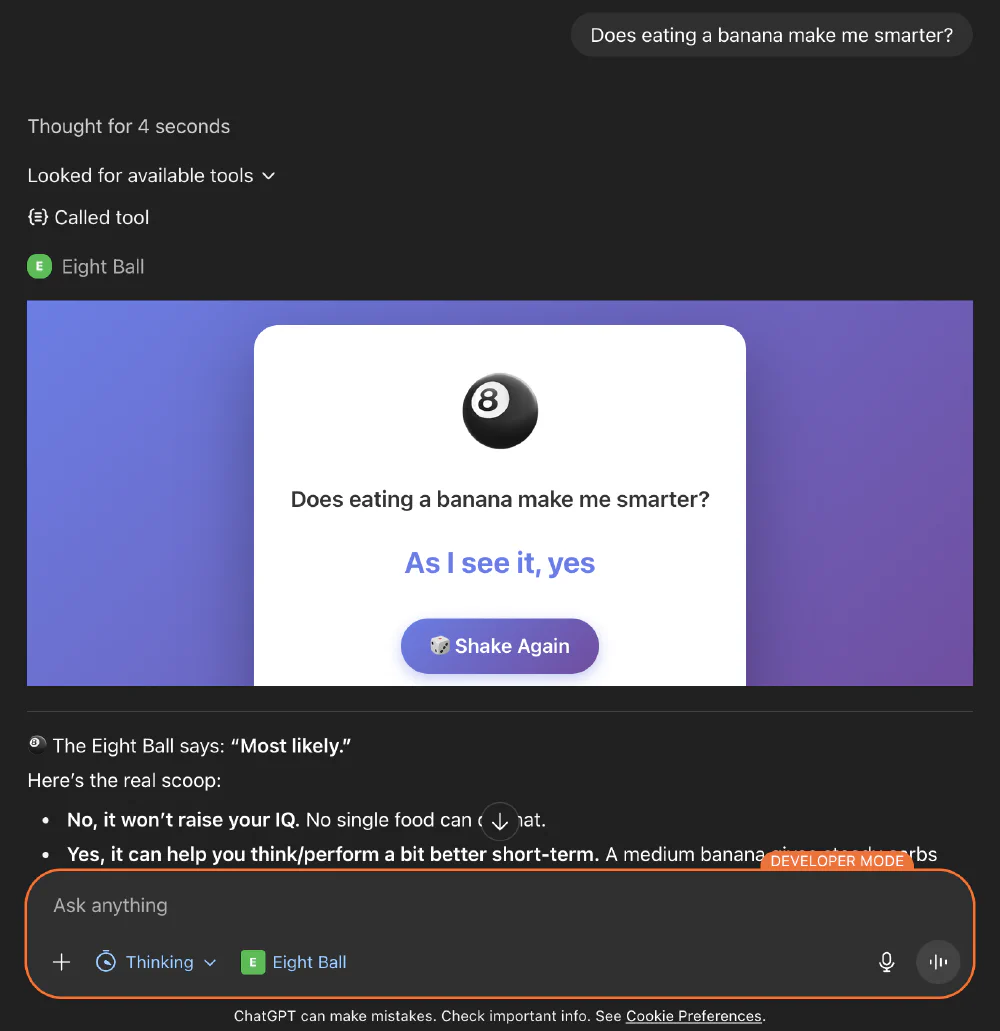
A Small Reflection
I can lack a bit of patience when things aren’t going my way with coding agents. They lure you in to expecting instant and satisfying results. I should temper my expectations and continue to invest time in experimenting in getting to a desired state, from a given starting point, by varying my approach and the tools / models I’m using. I’ll often push through a good deal of undesirable agent behaviour in pursuit of the elusive fix or feature I’m searching for, when what I should really be doing is stepping back, investing in tests, better instructions, and context.